



Short answer first: the Lucky Hills Casino app exists, but not as a download. There is no App Store or Google Play listing and no APK file. What the operator offers is a Progressive Web App — the site saves itself to your home screen from Chrome or Safari, opens without a browser bar, and runs the same account, cashier and lobby as the desktop version.
We installed the Lucky Hills app on a phone before touching anything else, because that is where most Canadians sign up and where a payout request is usually made. Below: the install steps for each platform, what the app changes for deposits and verification, the 20 spins it pays for the trouble, and where the risks sit. Payment limits and licence detail are in the full review.
- Format
- Progressive Web App — no store listing, no APK
- Install from
- Chrome on Android, Safari on iPhone and iPad, Chrome or Safari on a computer
- Price
- Free
- Account
- The same one — balance, bonuses and limits carry over
- Currency and languages
- CAD, English and French
- Install reward
- 20 free spins at 0.10 CAD, no deposit
- Strings attached
- x40 wagering, 75 CAD cap, paid once the account is verified
- Device requirements
- Not published by the operator
Why there is no Lucky Hills Casino app download
Real-money gambling apps face strict store rules, and offshore-licensed brands rarely clear them for Canadian users. A Lucky Hills Casino download from a store therefore does not exist. The operator does not explain its reasoning; it simply publishes install instructions for browsers instead of a file.
That has practical consequences worth knowing before you search for a LuckyHills download:
- Nothing to sideload. No unknown-sources permission, no APK, no store account.
- Almost nothing to store. The app is a shell around the live site, so a LuckyHills app download takes seconds rather than megabytes.
- No manual updates. A PWA generally loads the current version from the operator's servers; the operator publishes no update procedure of its own.
- It depends on your browser. Chrome and Safari are the two the operator names.
Anything advertised as a Lucky Hills Casino APK comes from a third party, not the casino. We would not install one: a repackaged file can carry anything, and there is nothing it would add.
Lucky Hills Casino app Android install
On Android the whole thing happens inside Chrome, and it takes under a minute.
- Open Lucky Hills Casino in Chrome using our link, checking the address as it opens.
- Tap the ⋮ menu at the top right.
- Choose Install the LuckyHills Casino App, then Install.
- Find the new icon on your home screen or in the app drawer and open it.
- Sign in, or register if the account does not exist yet.

If the menu offers no install line, update Chrome and reload the page; some Android skins label the same action Add to Home screen. Nothing else is required for Lucky Hills Casino Android users — no separate browser, no setting to unlock.
iPhone and iPad: Add to Home Screen
Apple hands the job to Safari, which stores the site as an icon rather than installing anything.
- Open the casino site in Safari from our link.
- Tap Share.
- Scroll to Add to Home Screen and tap it.
- Keep or edit the name, tap Add, then open the icon.
From then on the Lucky Hills Casino app takes the whole screen: the browser chrome disappears, which is most of what separates an icon from a bookmark. That is standard iOS behaviour rather than a promise from the operator, and the same account and balance follow you between the phone and a laptop.
Windows and macOS: the same app in a window
The Lucky Hills mobile experience is not limited to phones. Two more routes are published:
- Windows: open the site in Chrome through our link and click the install icon at the right of the address bar. Chrome adds a shortcut to the desktop and Start menu.
- macOS: in Safari use Share → Add to Dock; in Chrome, the same install icon as on Windows. Safari and Chrome are the browsers the operator names for Macs.
A Lucky Hills desktop window earns its place for live dealer sessions, where a bigger screen makes the table readable, and it keeps the casino out of your ordinary tabs.
What your device needs
No minimum operating system version, storage figure or install size is published, so the table below lists what the install method itself requires.
| Platform | Browser | Route | General requirement |
|---|---|---|---|
| Android phone or tablet | Chrome | ⋮ → Install | Current Chrome build |
| iPhone, iPad | Safari | Share → Add to Home Screen | Current iOS or iPadOS |
| Windows PC | Chrome | Install icon in the address bar | Current Chrome build |
| Mac | Safari or Chrome | Add to Dock, or the install icon | Current browser version |
A stable connection matters more than the handset your Lucky Hills app runs on. Games stream from the server, so nothing runs offline, and live tables use noticeably more data than slots — worth a thought if your plan is metered.
App or mobile browser: what actually differs
You can play in a mobile browser without installing anything. The account, the lobby and the cashier are identical; the differences are small and mostly about friction.
| Installed app | LuckyHills mobile casino in a browser | |
|---|---|---|
| Getting in | One icon tap | Open the browser, then the address |
| Screen | Full height, no browser bars | Bars take a strip of the screen |
| Signing in | One-time authorisation, per the operator | Depends on your browser session |
| 20 install spins | Yes | No |
| Games, cashier, support | Complete | Complete |
For a Lucky Hills mobile regular, the app wins on the spins alone. Visit once a month and the Lucky Hills Casino mobile site in a browser costs you almost nothing.
Banking from the phone: deposits, payouts and ID
This is the part we care about most, and the honest summary is that the app changes the convenience, not the rules. The Lucky Hills cashier inside it is the same one, in CAD.
| Method | In | Out |
|---|---|---|
| Visa, Mastercard | 20–3,000 CAD, instant | Not in the published table |
| MiFinity | 15–3,000 CAD, instant | Not in the published table |
| CashtoCode, Neosurf vouchers | From 10 CAD | Not in the published table |
| Crypto | From 10 CAD, Bitcoin 20, Ethereum 90 | 50–2,000 CAD, Ethereum from 60 |
| Inpay bank transfer | — | 50–2,000 CAD, 1 hour to 3–5 banking days |
Two habits make phone banking easier here. First, verify early: the operator asks for photo identification with at least a month of validity, a live selfie and a picture of the payment method, and a phone is the fastest device for all three, since the camera and the upload live in the same place. Second, remember that approval takes 30 minutes to 24 hours, occasionally 72, whichever device you used.
What the app does not do is add a payment option. A Lucky Hills payout gets no app-only method, no faster queue and no separate mobile limit — everything is capped at 2,000 CAD a request as it is on desktop.
The install bonus: 20 free spins, no deposit
The Lucky Hills Casino app bonus is the only no-deposit offer a new player can claim here.

- 20 free spins at 0.10 CAD each, so 2 CAD of spin value
- No deposit and no code
- Wagering x40
- Maximum withdrawal 75 CAD, the ceiling on any no-deposit win, paid after verification
- One per player, activated in Profile → Bonuses
Treat it as a free test drive rather than a windfall: 75 CAD is the most it can ever be worth, and x40 stands between you and that. Every other offer behaves identically in the app — the welcome package of up to 2,000 CAD with 100 spins, weekly cashback up to 10% at x5, level rewards — with the same 7.50 CAD ceiling on qualifying bets. The full arithmetic is in our bonus guide.
What the Lucky Hills mobile lobby holds
Nothing is held back for small screens. The operator counts 7,393 Lucky Hills games from 115 providers, and the app opens all of them.
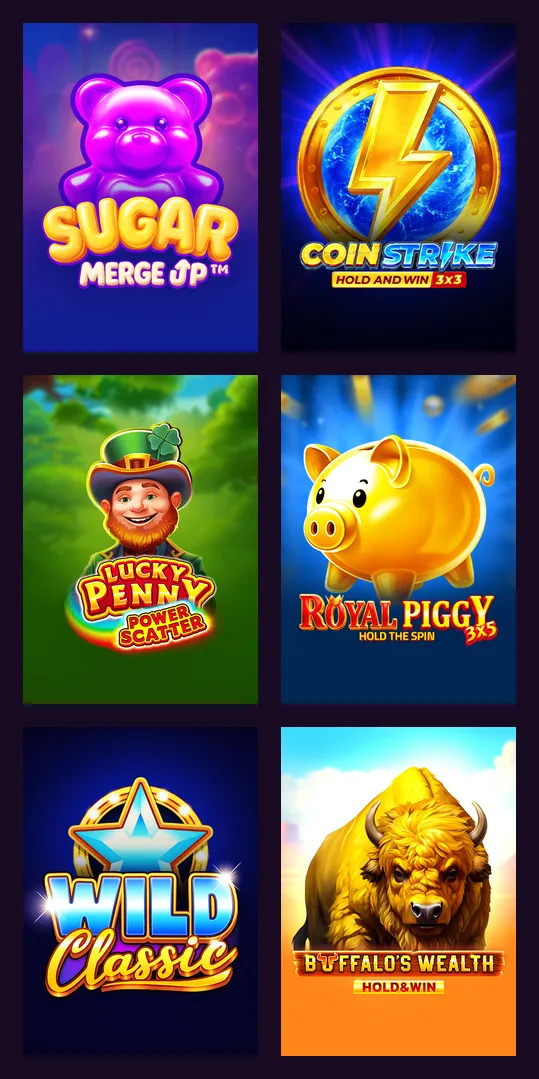
Slots are the bulk of it: Pragmatic Play, BGaming, Playson, Platipus, Gamzix and 3 Oaks among the studios, with Sweet Bonanza, Gates of Olympus 1000 and Big Bass Splash 1000 near the top of the most-played list. Demo mode works on the phone too, which is the cheapest way to test how a game behaves on a touchscreen before you stake anything.
Live tables in the Lucky Hills mobile casino come from around 20 studios and cover roulette, blackjack, baccarat, poker, bingo and game shows. They are the heaviest thing the app streams, so Wi-Fi suits a long session. RNG tables, crash games and jackpot slots complete the lobby, with a sportsbook and esports section on the same account. Remember that table games count nothing towards bonus wagering, whichever device you play them on.
Is the Lucky Hills app safe, and where should it come from?
The app is the licensed site in another wrapper, so it carries the same oversight: Complete Technologies N.V. under Curaçao Gaming Authority licence OGL/2024/923/0383, in force since 24 March 2025. Because it installs from a browser, it asks for no unusual permissions and no sideloading.
The risk that remains is where you install it from. Start from our link rather than from a link in a forum post. The operator's Canadian pages sit on luckyhills-ca.com, several other sites using the brand name belong to affiliates, and a convincing copy can harvest a login. A Lucky Hills Casino app login uses the same credentials as the website, which is exactly why they are worth protecting.
Responsible gambling tools travel with the account, not the device: deposit and loss limits, cooling-off from 24 hours to a month, session reminders, self-exclusion from a year. Support is the same too — live chat around the clock and email at [email protected] — and the interface runs in English and French.
Canadian rules. The licence is from Curaçao, not a province, and the brand is not on the iGaming Ontario list, so Ontario's protections do not reach it. You must be 19 or older in most provinces and territories, 18 in Alberta, Manitoba and Quebec.
App questions
Is the Lucky Hills Casino app download free?
Yes, on both counts: no purchase, no store, no subscription. The browser saves the site as an app at no cost, and the install pays 20 free spins.
Is a Lucky Hills APK available for Android?
No. The operator publishes no APK. Install from Chrome instead, using the ⋮ menu, and avoid files offered under the brand name elsewhere.
How do I complete a Lucky Hills Casino app download on iPhone?
Load the site in Safari, use Share, then pick Add to Home Screen. The icon behaves like an app, and no App Store listing is involved.
Does the LuckyHills app include live casino?
Yes, the whole lobby is there: slots, live tables from around 20 studios, RNG tables, crash games and the sportsbook.
Can I deposit and withdraw in the app?
The full cashier is available, with the same limits: deposits from 10 CAD, payouts from 50 CAD to 2,000 CAD per request by bank transfer or crypto.
Do I need a separate account for the LuckyHills mobile casino?
No. One registration covers the app, the mobile browser and the desktop site, with a single balance in CAD.
How do I remove it?
Delete the icon as you would any app; the account is untouched. If you want a real break, set a limit or use self-exclusion in your profile rather than only deleting the shortcut.
Our verdict on the Lucky Hills mobile app
For a phone-first player the Lucky Hills app is the best version of this casino. It installs in under a minute on Android, iPhone, Windows or Mac, needs no APK and no store account, carries the full lobby and cashier, and pays 20 no-deposit spins for the effort. Verification from a phone is genuinely quicker, which matters more than it sounds when a first payout is waiting on a selfie.
What the app cannot fix belongs to the brand: x40 wagering, a 7.50 CAD ceiling on qualifying bets, payouts from 50 to 2,000 CAD by bank transfer or crypto only, and a Curaçao licence rather than provincial regulation. Install it if you play here regularly; read the payment rules before you deposit either way.